DMARC Monitoring That Just Works
Clear and actionable insights into your outbound email configuration and authentication. Quick to set up, easy to understand, rewarding to use. All features free during our launch period.
Trusted by Fortune 100 and Fortune 500 teams, and startups too.
Why DMARC Monitoring Matters
Email Deliverability
Email providers require DMARC setup for inbox placement. Without proper email configuration (and authentication monitoring), email marketing campaigns and transactional messages may be rejected or marked as spam.
Brand Protection
Misconfigured email authentication and domain spoofing erodes customer trust and damages your brand. DMARC reporting tools give you the visibility you need to fix issues before they impact deliverability.
Actionable Insights
DMARC reports reveal who's sending email using your domain, both authorized and unauthorized. Understanding this activity is essential for maintaining email security and identifying potential threats.
The "Yahoogle" Mandate: Yahoo and Google Now Require DMARC
Starting February 2024, Yahoo and Google began requiring domain owners to implement DMARC to prevent spoofing and ensure email delivery. A DMARC record must be added to DNS with established SPF and DKIM authentication. Non-compliant emails may be rejected or sent to spam—especially for bulk senders (5,000+ daily emails).
For teams running email marketing at scale, DMARC compliance is no longer optional. It's a prerequisite for reaching the inbox.
While you can start with a monitoring policy (p=none), strong enforcement (quarantine or reject) is increasingly required to prevent unauthorized use of your domain. These measures protect your brand from phishing, reduce spam, and improve email deliverability.
The Viewleaf Solution
Simple DMARC aggregation with clear, actionable reporting. All features — including paid-tier capabilities — are free for early adopters during our launch period.
Early Access Launch Offer
Everything you need to monitor DMARC — plus all paid-tier features at no cost during our launch period. Sign up now to lock in early access.
- SPF, DKIM, and DMARC alignment insights
- Visual dashboards and reports
- Clean, actionable notifications
- Single collector, multiple domains Unlimited collectors
- 60 days of data retention Unlimited data retention
- Fine-grained search, across entire history Bonus
All paid features included — limited time only
Paid Tier Coming Soon
Everything listed here is currently available at no cost during our launch period. Users on paid plans will get early access to the enterprise option, with MCP integration, Single Sign-On (SSO), and more.
- All early access features, plus
- Unlimited collectors
- Unlimited domains
- Unlimited data retention
- Fine-grained search, across entire history
Simple Setup, Clear Results
Viewleaf makes DMARC reporting intuitive and rewarding. Get the insights you need without the complexity you don't.
Quick to Set Up
Start receiving insights in minutes. Viewleaf aggregates DMARC Aggregate (RUA) reports automatically. Just point your DMARC records and you're done.
Highly Visual
See your email authentication status at a glance. Clear charts and graphs make it easy to understand what's happening with your domain's email.
Actionable Reporting
Clean, focused reports highlight what matters. Know immediately when SPF, DKIM, or DMARC alignment issues need attention.
Smart Notifications
Get alerted to potential spoofing attempts and authentication failures. Viewleaf prioritizes actionable information so you can respond quickly.
Data-Rich Insights
See who's sending email on behalf of your domain with geographic visualization and detailed breakdowns by source and authentication status.
Proven in Production
Built on technology already processing real DMARC data. See it running live at sh4meful.com before you sign up.
How It Works
Up and running in three steps.
Create a Collector
A collector is a unique RUA email address where your DMARC reports will be sent. Set up one collector per domain, or point multiple domains at a single collector.
Update Your DMARC DNS Record
Add your collector address to your domain's DMARC DNS record. We'll guide you through this step-by-step if you need support.
See Your Results
Reports start arriving automatically. Viewleaf parses and visualises them so you can see exactly who is sending email on behalf of your domain and how it's authenticating.
See It in Action
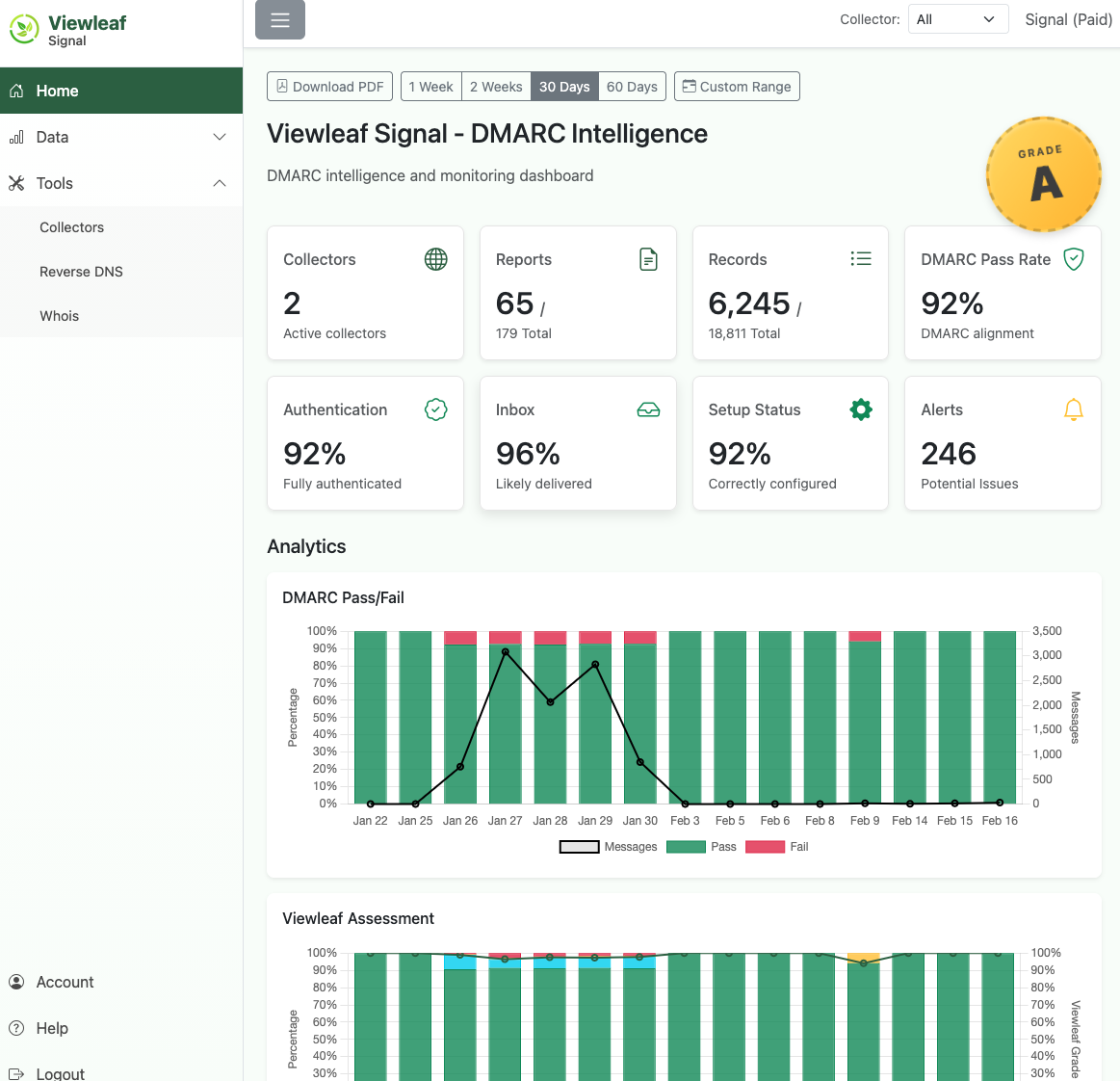
At-a-Glance Analytics
Your dashboard shows DMARC pass rates, authentication states, inbox likelihood, and alerts, across all your domains and collectors. Four configurable time ranges and custom date selection make trend analysis straightforward.
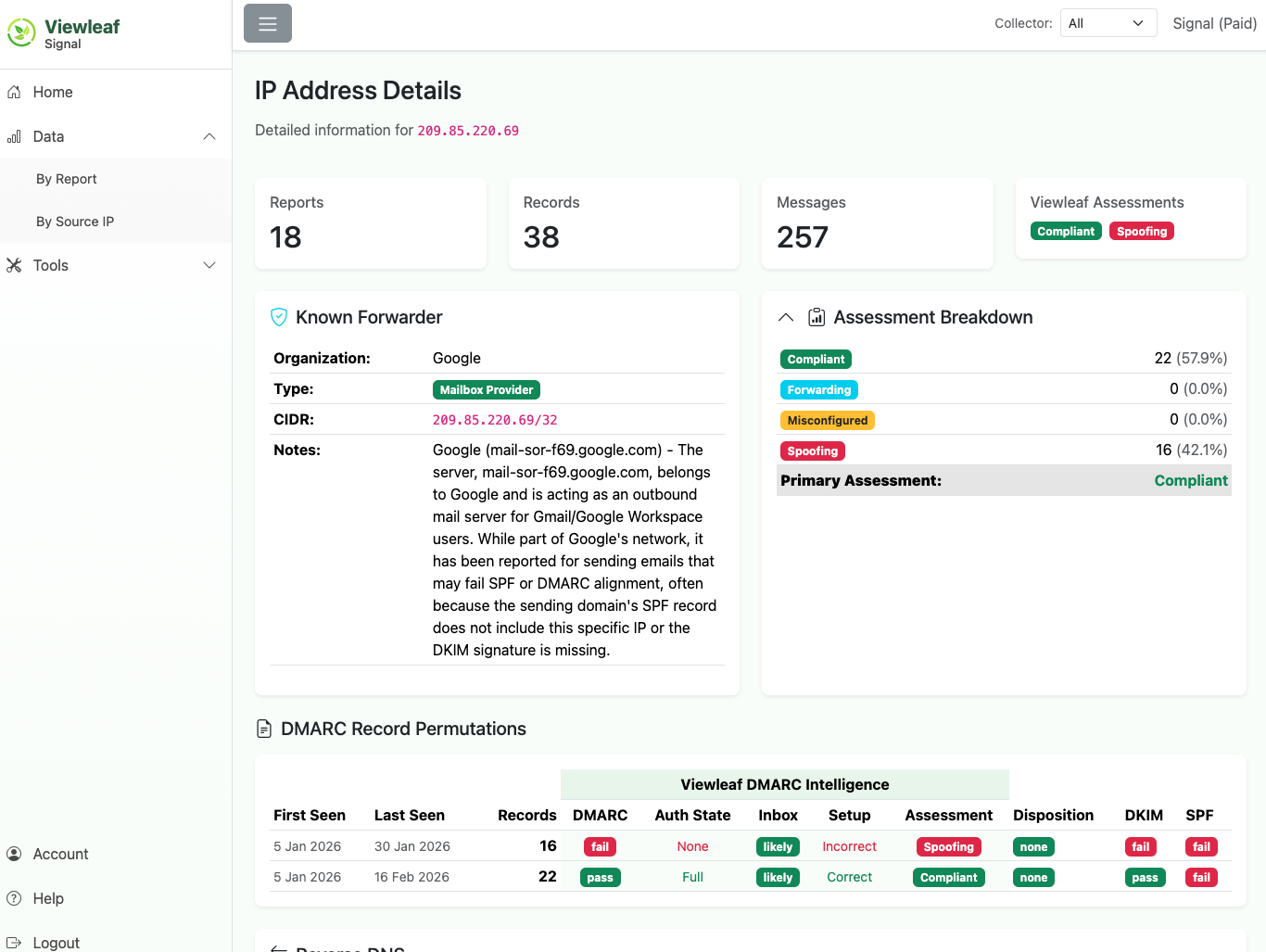
Deep IP Intelligence
Drill into any source IP to see who owns it, its geographic location, WHOIS registration details, reverse DNS, and a complete history of its DMARC authentication, all without leaving the app.
Get Full Access to Viewleaf Signal — Free During Launch
Create your account now and get all features unlocked at no cost. No credit card required.